
Loot & statistics
LootView
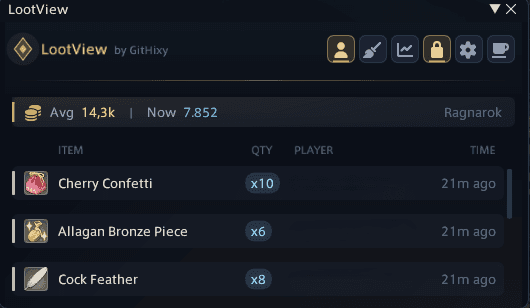
See every item you and your party pick up, as it drops.
A live loot tracker for you and your party, with a permanent history and statistics behind it. Every drop shows up the moment it lands, Need/Greed rolls get a panel of their own, and your haul is priced for your home world through Universalis.
- Version
- v1.6.5
- Installs
- 7k
- Updated
- 11 Nov 2026
- Dalamud API
- 15
What it does
Built for the moment you need it.
Live overlay
Icon, rarity, quantity, who got it and how long ago — with a brass sweep on every new row. Crafting, gathering, retainers, chests and duty rewards are all tracked.
Need / Greed, readable
Time left on every item, every roll and pass, who is still deciding, and the winner crowned. Roll straight from the panel; the game's window stays out of the way.
What it's worth
A running market value of your haul for your home world via Universalis: what items actually sell for, and what the cheapest listing is today.
Currencies at a glance
A drawer with every currency you hold and its cap, turning amber as you near it, plus the weekly tomestone bar.
History & statistics
Searchable history, rarity split, play streaks, hourly activity, duty leaderboards with personal bests, and export to JSON or CSV.
Every client language
English, Japanese, German and French. Loot is read from the game's own log messages, never from the English wording of chat.
Commands
Type it in chat.
| /lv | Open the loot tracker |
| /lv config | Open the settings |
Plays by the rules
Your history stays in your Dalamud config folder and is never uploaded. Price and loot-table lookups send only an item or duty ID, and can be turned off.
Latest changes
What's new in v1.6.5
Version 1.6.5
- Jar on its own: the loot jar can now stay on screen by itself, just the glass with no frame. Move it, resize it from its edges and lock it in place from Settings > General. It fades back while nothing is happening and comes forward when something drops in.
- The loot jar now holds exactly what the loot list shows: clearing the list pours it out, and drops that leave the list leave the jar too.
- Ticker: Ctrl+click a drop, or pick Dismiss from its right-click menu, to clear it early. A broom button next to the ticker's controls clears every drop at once.
Install
Right there in the official installer.
You need XIVLauncher with Dalamud enabled.
- I
Open the plugin installer
Type /xlplugins in the chat box.
- II
Search
Look for LootView under All Plugins — no extra repository needed.
- III
Install
Press Install. Updates arrive on their own through Dalamud.
More from the collection
All plugins
HitSpark
Combat text
Replace the game's combat numbers with animated, styleable fly text.

FateLimit
World overlay
See the edge of every FATE, and know before you step out of it.

Chant
Cast bar
A castbar that tells you when you can move, in the shape you like.